
BETTER PHOTOS / PRINCIPLE 09
Light against dark.
A clearer subject.
A sharply focused subject can still disappear into its surroundings. Before adding blur or increasing saturation, look at the brightness immediately behind its outline. A pale cup against a pale wall and the same cup against a dark cupboard tell different visual stories.
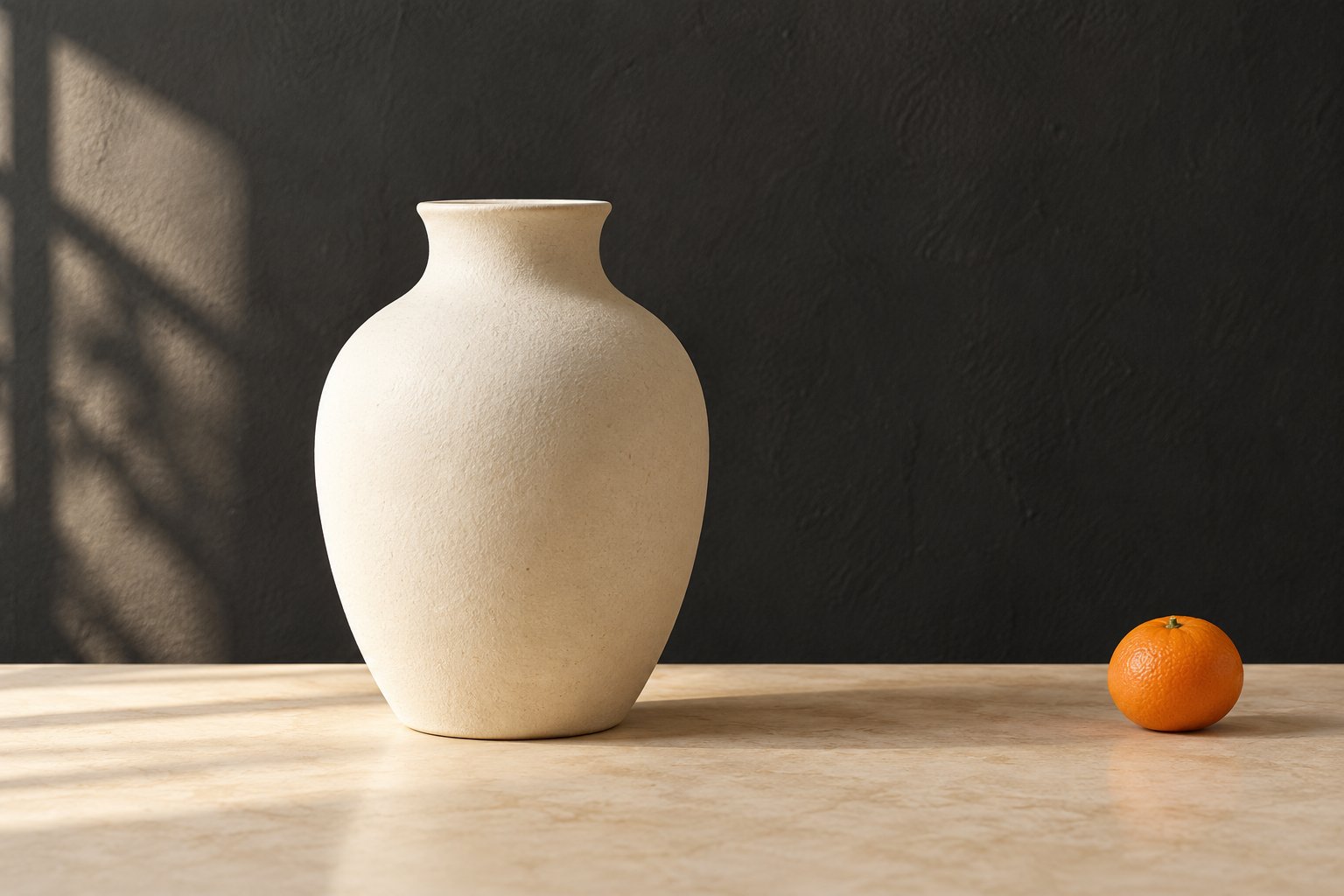
Choose a background whose brightness makes the important outline readable.
What tonal contrast means
Tonal contrast is a difference in lightness and darkness. Here we are interested in the local difference between the subject and the area directly behind it, rather than a contrast slider applied to the whole picture. A light edge beside a darker area is often easier to distinguish.
Colour contrast is a separate clue. Two objects can have different colours but similar brightness. A temporary black-and-white preview can help you notice this; treat it as a diagnostic, because different conversions can change how colours become grey.
Start with the outline, not the whole room
Choose one important contour: a cup handle, the edge of a flower or a person’s shoulder. Follow it around the frame. Notice where it becomes hard to distinguish, then look for a brighter or darker patch of background nearby.
For example, an ivory vase may merge with a cream curtain. Move a small distance sideways until a darker wall sits behind the vase. You have changed the relationship between subject and background without asking the subject to become more colourful or adding an artificial blur.
A simple sequence before the shutter
First decide what the picture is about. Next inspect the background immediately around that subject. Move the phone slowly sideways, or move a small still-life object if the scene is yours to arrange. Keep checking the entire contour rather than fixing one edge and losing another.
Take a first picture, then review the subject at a small display size. Check focus and exposure again after moving. If the phone has brightened the entire scene, compare the actual outline in the saved image rather than assuming the live preview will remain unchanged.
Three everyday applications
For a pale flower, a shaded hedge may give a clear outline without needing a perfectly black background. For a dark bag, a light wall can work better than a dark doorway. For food, start by comparing a light plate with a darker surface or the reverse.
Do not assume that the darkest available backdrop is the best. A very bright window elsewhere in the frame may still compete with the subject. Look at the whole picture after solving the local edge, and simplify unrelated bright patches when they distract.
Common mistakes and useful exceptions
Increasing global contrast can darken shadows and brighten highlights without solving a subject that overlaps a similarly bright patch. Start with positioning. Also avoid losing important pale detail by making the scene too bright just to separate a dark subject.
Low contrast is not a failure. Similar tones can create a gentle, quiet picture, while a silhouette deliberately hides internal detail. Choose stronger separation when recognition matters; keep softer boundaries when mood or a subtle pattern is the point.
Five-minute exercise: one object, two backgrounds
Place a pale cup or vase on a stable table. Photograph it against a light background, then a darker one, using the same camera and a similar framing. Keep the light on the object as consistent as you can. Do not change several editing controls between the two shots.
Compare where the rim, handle and sides are visible. Briefly inspect copies in black and white, then return to colour. Write one sentence about which version suits your intention. Repeat with a dark object against a light background; this is an observation exercise, not a quality score.
Bring the habit to your next photo
Adobe’s composition material discusses contrasts in light and colour, while its background guidance treats the backdrop as part of the composition. The cup exercise here is a practical way to explore that idea, rather than a claim that one combination always wins.
Try the exercise with your usual phone camera, then use the same observation in your next Take PRO session on iPhone. The app interface is English. Check the App Store for current terms; the useful habit is simply to inspect the background before committing to the frame.