
BETTER PHOTOS / PRINCIPLE 14
Three points.
One arrangement.
Three objects on a table can look accidental or deliberately connected. Their positions often make the difference. In this exercise you will arrange three pears, inspect the gaps and compare several layouts. The aim is not perfect geometry. It is to make a clear choice about why these three elements belong in the same photograph.
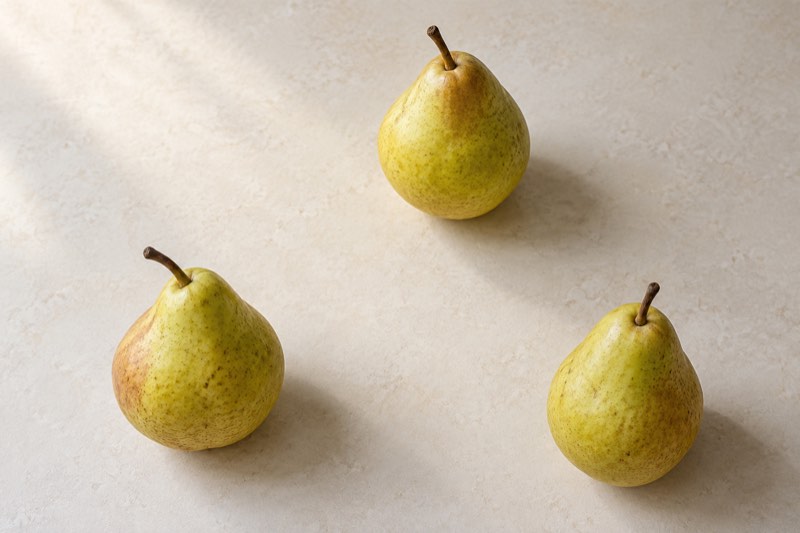
Look at the relationship between three objects before adding another.
Find the triangle without drawing it
Three points that do not lie on one straight line can imply a triangle. In a photograph, the points may be objects or distinct parts of them. You do not need to draw connecting lines or add a grid to the finished picture.
Point to the center of each pear on the preview. If they nearly form a row, move one away from that line. This exercise differs from the rule of thirds, which divides the whole frame into sections.
Begin with three objects and a clear surface
Choose three pears, stones or small bowls that belong to you, and a plain surface. Move packaging, cables and any fourth object aside. Use window light that leaves the outline and texture of every object readable.
Keep the background and light consistent while changing the arrangement. Otherwise you cannot tell which change affected the picture. If one pear is much brighter or larger, deliberately make it the main element rather than pretending that all three carry equal weight.
Place two points, then position the third
Put two pears toward the lower part of the intended picture. Place the third higher up and slightly off center. Judge the phone screen, not just the tabletop: the relationship needs to work in the flat image that you will save.
Move only the third pear, first closer to the pair and then farther away. Watch the empty area inside the arrangement. Equal sides are unnecessary; look for a distance that connects the objects without making them appear crowded.
Check gaps and camera height
Make the first picture from above, with the phone reasonably parallel to the table. Then lower it to an angled view. Does the rear pear disappear behind the front one? Can you still identify three separate centers in the image?
A tiny gap between outlines may vanish in a thumbnail. Widen it, or make any overlap deliberate and clear. Inspect stems and shadows too: an accidental connection can turn otherwise separate fruit into an awkward, unreadable cluster.
Try the idea beyond still life
On a walk, look for a relationship between three planters or architectural details. Move yourself to compare their positions in the frame. You do not need to rearrange someone else’s property or add an object that was absent from the scene.
For a group picture, compare the positions of three faces on the screen, but put comfort before geometry. Start with relaxed poses and visible faces, then consider a small difference in height if it suits the people and the setting.
Know when another layout works better
A row of three bowls can communicate a series or make size comparisons easier. One object may be enough for a quiet product picture. A triangle is an option, and a shape alone cannot give an arbitrary scene a purpose.
A common mistake is adding an unnecessary third prop just to satisfy the rule. Another is stretching the arrangement to the frame edges until it becomes three disconnected fragments. Return to what you want the picture to show before moving anything else.
Practice: save three versions
Spend five minutes photographing the pears in a row, a broad triangle and a tighter group. Keep their size in the frame, the background and the light reasonably consistent. Compare the saved pictures as thumbnails, then enlarge them to check the outlines.
Choose one version and name a specific reason: clearer gaps, a stronger relationship or a calmer arrangement. Bring that observation into your next Take PRO session on iPhone. The app interface is English; check the App Store for current availability and terms.