PHOTO PRINCIPLES / PRINCIPLE 16
Step into shade.
Keep the light.
A bright day does not require putting your subject in direct sunshine. Moving a small object beside a sheltered wall can make its shape and delicate details easier to read. This principle is about choosing a place and judging the light, not adding a filter. You will use one simple subject and check the result in the saved photograph.
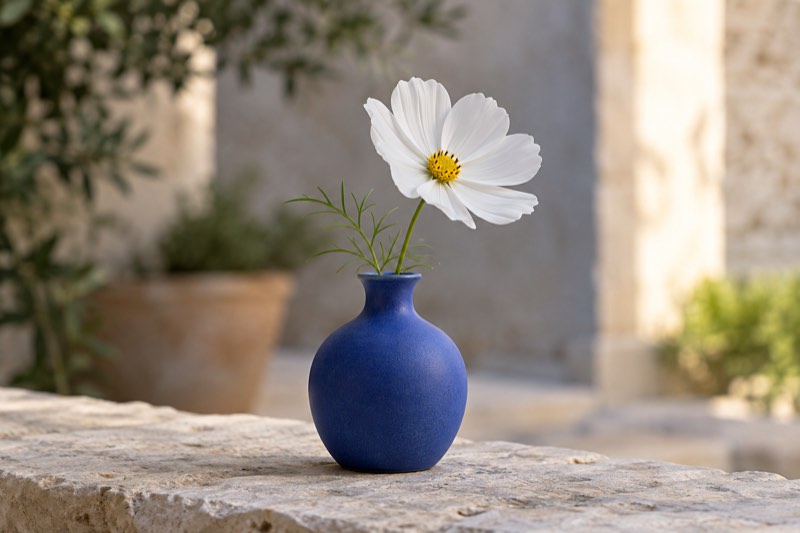
Find open shade, avoid patches of sunlight and compare light on a white flower. Practical steps, common mistakes and a phone exercise.
What open shade means
Open shade blocks direct sunshine while leaving the subject exposed to daylight from the sky. Look near the edge of a building’s shadow.
Do not automatically choose the darkest corner. First inspect the object: can you see its form and small details? In our example, the white petals should retain their fine lines rather than become an undifferentiated white patch.
Build a simple scene
Place a small vase and flower on a stable surface in shade. Keep the entire flower and vessel sheltered, including the highest petal. Position the phone so that the flower sits against an uncomplicated background.
Move slightly sideways and watch any bright patch behind it. That patch can suggest a sunny day, but should not swallow the flower’s outline. The illustration proposes a scene; it is not a comparison of camera performance.
Look at the direction
Notice the transition between the brighter and darker sides of the vase. Soft light need not remove every shadow. A gentle brightness difference helps describe a rounded form.
Turn the vase a quarter turn, then try moving the phone. Compare those decisions separately. For a portrait, a small turn of the person can provide a similar experiment; nobody needs to look directly into the sun.
Take a photograph, then inspect it
Start in the ordinary photo mode of your chosen app. Hold the phone steadily, choose the important detail and take a photograph. Inspect the petals and the edge of the vase in the saved file.
If white surfaces lose detail, try a lower brightness using the exposure adjustment available in your app. Names and gestures vary. Do not assume every Apple Camera control is implemented in exactly the same way in Take PRO.
Three common traps
The first is sunlight filtering through leaves: check whether bright spots move over the petals in the wind. The second is an extremely bright background that draws attention away. The third is changing position, zoom and settings at the same time.
For the next photograph, correct just one thing. If the flower moves, wait for a quieter moment. A smeared petal does not prove that soft light is unsuitable; movement and illumination are separate issues.
When to choose differently
Hard light can be intentional when the subject is a crisp shadow, a geometric patch or a glint. This principle does not require hiding every scene from sunshine.
For a delicate flower, shade is a useful starting point. For a pattern cast by a railing, keep the sun. Explain the choice through your subject rather than treating one kind of lighting as universally correct.
A five-minute exercise
Photograph the flower in direct sunshine and again in open shade. Keep framing, distance and background similar where the location allows. Compare the petals, shadow transitions and the first thing that catches your eye.
Write one sentence explaining your preferred version. Repeat with a pale fabric. Bring that habit to your next Take PRO session: look at the light before taking the photograph. The app interface is in English.