BETTER PHOTOS / PRINCIPLE 15
Choose the detail.
Put it in focus.
A beautifully lit picture can still disappoint when the important detail is soft. Before taking another photo, name the part you want the viewer to inspect: the rim of a cup, a flower’s center or a person’s nearer eye. This guide turns that choice into a simple two-object exercise. The goal is deliberate sharpness, not the strongest possible background blur.
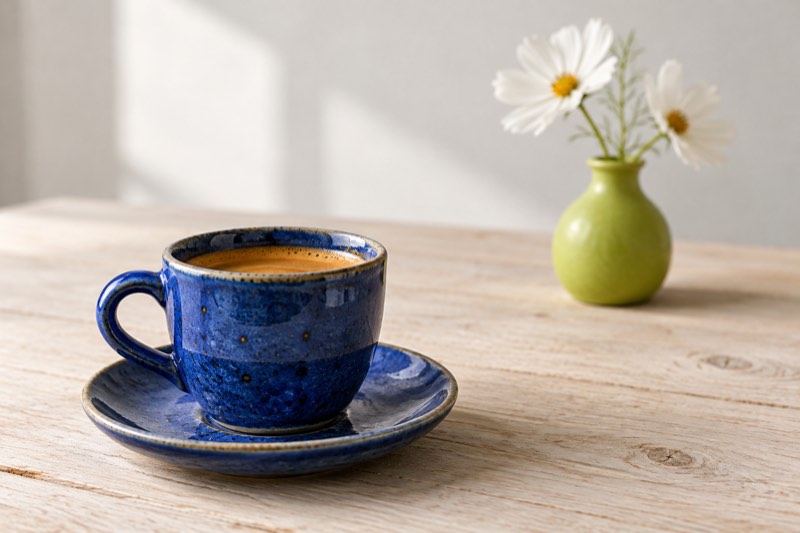
Decide which detail must be sharp before you take the picture.
Choose a detail, not just an object
“The cup” is a useful subject, but “the front rim and the speckled glaze” gives you something specific to check. Look for an edge or a small texture that should remain readable in the saved picture. A blank patch gives you little evidence when comparing results.
If two subjects compete, decide whose story you are telling. In a photograph of a handmade cup, the flowers can provide context. In a photograph of the bouquet, the cup may simply establish the table setting. Make that decision before changing controls.
Build a scene you can compare
Place a cup near you and a vase farther along a table. Leave a visible gap between their outlines and use gentle window light. Keep the cup comfortably within the camera’s working distance. Put the phone in a steady position and avoid changing the zoom between pictures.
Choose one detail on each object: the cup’s rim and a petal edge, for example. Keep both visible. This is a comparison exercise, so moving the vase, changing your angle and changing focus all at once would make the result harder to interpret.
Set the focus in Apple Camera
In Apple Camera, tap your chosen detail. Hold to lock focus and exposure; tap again to unlock. These controls refer to Apple Camera.
For this exercise, begin without a lock. Make a picture with the cup selected, then another with the flower selected. Keep your position steady and let the preview settle. Check the saved images rather than assuming that a tap guarantees the result you wanted.
Judge sharpness and brightness separately
When comparing your two pictures, first inspect the rim and petal at the same enlargement. Ask whether their edges and textures look clearer. Then compare how light or dark the pictures are. A brighter surface can attract attention even when it has no extra detail.
Do not choose the winner solely because one frame looks brighter. If the light changes while you work, repeat the pair under steadier conditions. This exercise does not require a particular exposure value, nor a claim about controls inside Take PRO.
If the subject is still soft
If the cup never becomes clear, move the phone slightly farther away and repeat. Do not keep pushing closer while tapping the same indistinct patch. Check that the lens is clean and that you are not photographing through a smudged surface.
Motion is another possibility. Brace your hands and try a stationary subject in brighter, even light. If the whole image is streaked rather than just the far object looking soft, changing the selected detail alone may not solve the problem. Compare one change at a time.
When both objects remain sharp
Depth of field is the zone of acceptable sharpness around the focused distance; lens characteristics and distance affect its extent.
Your phone may show both the cup and vase clearly. That is a valid result, not a failed exercise. Do not invent a dramatic blur to prove that focus changed. For a group or a scene where several details matter, broad sharpness may be exactly what you need.
Practice: two pictures, one explanation
Spend five minutes making the cup-focused and flower-focused versions. Inspect the same two details at equal size, then look at both pictures as small thumbnails. Write one sentence explaining which version better communicates the subject, or why neither shows a useful difference.
Next, try the same decision with a book cover and an object behind it. Choose the important detail before lifting your phone. Bring that habit into your next Take PRO session: look, choose, then shoot. The app interface is English.